
Light or network gone? (Enterprise)
The Enterprise till keeps selling for up to 24 hours without a connection, then syncs. The Professional plan does not include the offline till.
For supermarkets, shops and wholesalers with tills, branches and staff.
Every sale, transfer and carton recorded. Spot what is missing before the month ends.
Simplebks is a point of sale, stock and accounting app for supermarkets, provision stores and wholesale depots. Every sale posts to your stock and your books.
POS starts on Professional. See POS & Checkout.
The Enterprise till keeps selling for up to 24 hours without a connection, then syncs. The Professional plan does not include the offline till.
Sales, purchases and expenses post to one set of books, so VAT and withholding tax reports come from your own records (Professional and up). Try the free VAT calculator.
| Basic | Professional | Enterprise | |
|---|---|---|---|
| Users included | 1 | 2 | 5 |
| POS with split payments and card terminals | No | ✓ | ✓ |
| Barcodes, scale labels, quick keys, price checker | No | ✓ | ✓ |
| Customer display (cart, total, change, second screen) | No | ✓ | ✓ |
| Customer screen with your own ads | No | No | ✓ |
| 24-hour offline till and the Offline sales screen | No | No | ✓ |
| Promotions, loyalty, gift cards, combos | No | ✓ | ✓ |
| More than one branch, stock transfers | No | ✓ | ✓ |
| Stock counts (Add and Replace) | No | ✓ | ✓ |
| Stock movement and stock planning reports | No | ✓ | ✓ |
| Carton and piece units, variants | No | ✓ | ✓ |
| Wholesale prices, minimum order quantities | No | ✓ | ✓ |
| Price groups | No | No | ✓ |
| Purchase orders and supplier returns | No | ✓ | ✓ |
| Customer credit limits and advances | ✓ | ✓ | ✓ |
| Products in your catalogue | Up to 200 | Unlimited | Unlimited |
| Profit and loss statement | ✓ | ✓ | ✓ |
| Balance sheet, cash flow, VAT and withholding tax reports | No | ✓ | ✓ |
Yes, on Professional and Enterprise. Each branch has its own stock, you can transfer stock between branches and depots, and every branch reports into the same accounts. Each extra branch uses one extra business slot; see the pricing page.
Yes. Standard barcodes scan straight into the cart. Weighed products scan from the scale label, and a product marked Sold by price label sells at the price printed on its label.
Yes. One sale can combine cash, bank transfer, card terminal, gift card, loyalty points and a customer's advance balance.
Yes. Activate your terminal once in Settings, Bank Accounts, then choose Card Terminal at checkout, pick Moniepoint, OPay or Other and add the slip reference. Not available while the till is offline. Simplebks records the payment and marks it unverified until it matches your bank reconciliation. There is no live link to the terminal provider.
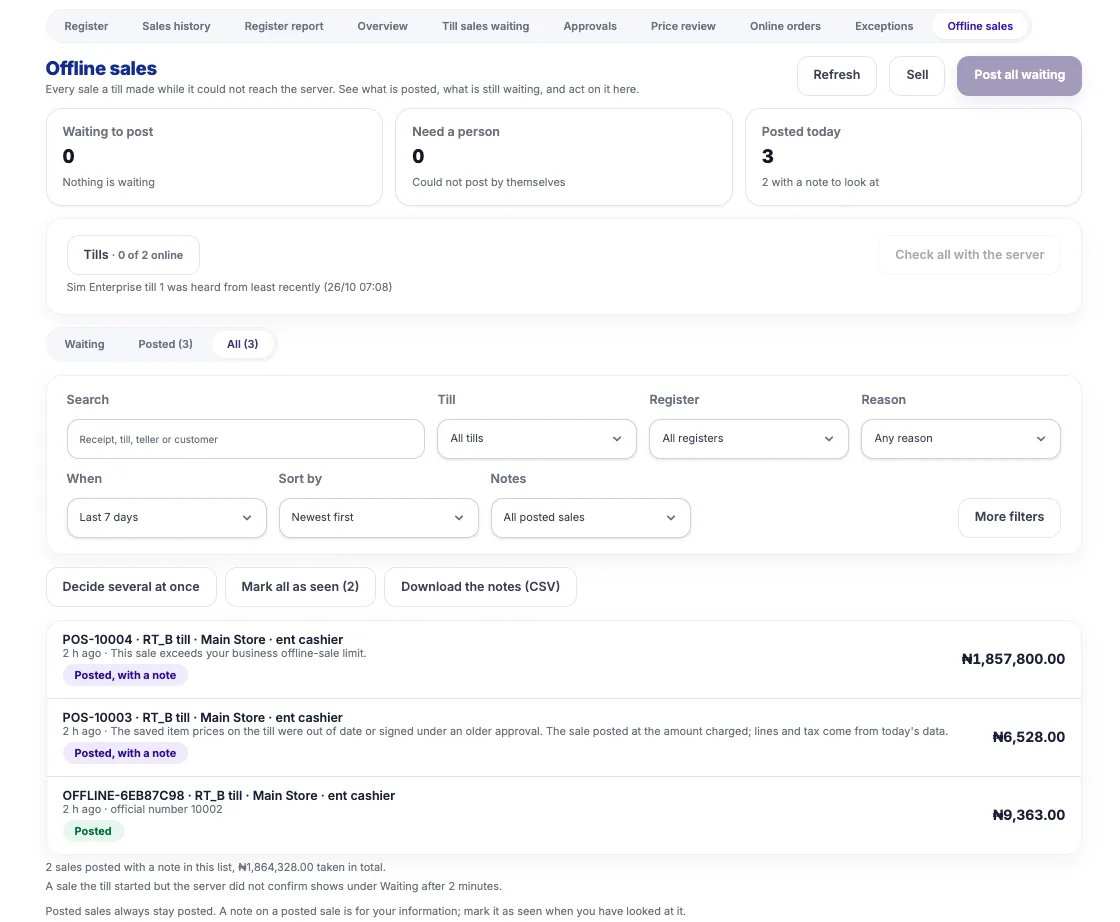
Yes, on the Enterprise plan. An approved till keeps selling for up to 24 hours with no connection, then syncs. One Offline sales screen shows what is waiting and what needs a person. The Professional plan does not include the offline till.
Available on Professional and Enterprise. In Replace mode the number you count becomes the stock. In Add mode the counted units are added to a balance you know is correct. You review the lines before anything posts.
Yes, on Professional and Enterprise. One product carries a carton price and a piece price, and a wholesale price sits next to the retail price. Price groups for customer tiers are an Enterprise feature.
Yes, on Basic and up. Set a credit limit on each customer and a cap for the business. Going over the limit needs the owner or someone with override permission.
Every sale, purchase and expense posts to your accounts, and the VAT and withholding tax reports are on Professional and Enterprise. You can also record a customer's WHT certificate against an invoice.
Yes. Download the product template, fill it in and upload it. Basic includes up to 200 products; Professional and Enterprise are unlimited.
Professional includes 2 users and Enterprise includes 5. You can add extra users; see the pricing page.
Top sellers sit on one-tap keys, and staff can look up a price or share a public price-check link; customers never see your cost. Print receipts on a 58 mm or 80 mm thermal printer, download or email a PDF, or send a receipt link on WhatsApp. The till warns the cashier before a sale goes below cost. Promotions, loyalty, gift cards and staff sales targets are on Professional and up. When a user lacks permission for a discount, refund, credit sale, loyalty redemption or gift-card payment, a supervisor approves by PIN at the till or from the remote approvals queue. The customer display can run on a second screen, and on Enterprise it shows your own ads. An activity log shows what staff did and when.
Set minimum order quantities and multiples, for example at least 12 bottles in steps of 6; the rule is checked on invoices, quotes, pre-orders, sales and the till, and a manager override is logged (Professional and up). Turn on the delivery credit gate to hold a waybill print or delivery until payment covers the goods or an approver signs it off. Print a price-less waybill, send customer statements and balance letters, and let overdue reminders go out by email. Send a quote and convert it to an invoice, or upload a spreadsheet to create many invoices at once. Customers can also pay in advance and draw the balance down as they buy. Buying from suppliers is on the Purchasing & RFQ page.
Set a reorder level on each product. The stock planning and stock movement reports (Professional and up) show what to reorder, your fastest and slowest movers, and ABC and aging analysis. With more than one branch, choose which branches sell which products; it applies to sales screens, POS and invoices. Variants carry their own barcode, price and stock, and combos sell as one line and take their parts out of stock.
A single Offline sales screen lists what is posted, what is still waiting and what needs a person. A manager with the right permission posts everything that is waiting with one button, and anything unusual goes to a short exceptions report instead of stopping the line. A teller sees only their own offline sales. Enterprise only.
Ring up a sale and your stock, books and VAT update with it.